

Medical mobile cart accessories should be selected as a coordinated configuration, not added one by one after the base is chosen. A monitor mount, tray, drawer, basket, handle, cable hook or device bracket changes reach, clearances, cable paths, cleaning access, mass distribution and service procedures. B2B buyers should map the workflow, define each accessory’s content and interface, build an option matrix, and approve one representative loaded configuration before production.
CRF’s core direction is custom aluminum alloy medical equipment carts with three-, four- and five-caster bases. This article covers equipment-support carts—not patient walkers—and explains how to prepare an accessory package for OEM/ODM review. It is procurement education, not medical, safety or regulatory advice. Project-specific engineering and validation remain the buyer’s and responsible parties’ work.
Why an accessory list is not enough
The same accessory name can describe very different interfaces. “Monitor mount” does not state the equipment pattern, device mass, adjustment envelope or viewing position. “Drawer” does not state contents, usable internal dimensions, extension, latch or cleaning method. “Cable holder” does not identify cable lengths, connectors or transport state.
Accessory interactions are equally important. A side basket may interfere with a doorway or handle. A drawer may collide with a column component. A monitor arm can change the equipment envelope in transport. A cable loop can block a brake pedal. A low-mounted enclosure can reduce access to base fasteners. The approved configuration therefore needs a controlled layout, not a generic catalog of options.
Start with a workflow-and-equipment map
Observe or document each state the cart must support:
- loading and setup;
- transport through doors, corridors and elevators;
- approach to the operating position;
- parked equipment use;
- access to supplies and controls;
- cable connection and disconnection;
- cleaning and inspection;
- replacement of devices or consumables; and
- storage, packaging and shipment.
For each state, record who uses the cart, which device or item is handled, where the user stands, which components move and what must remain visible. This prevents a visually tidy arrangement from creating an unusable sequence.
Specify accessories by function and evidence
| Accessory | Define in the RFQ | Evidence to review |
|---|---|---|
| Equipment tray | Device outline, feet, connectors, retention and removal path | Device drawing and fitted-sample check |
| Monitor mount | Approved interface, device mass input, viewing and adjustment envelope | Controlled interface drawing and representative device |
| Drawer | Contents, usable internal space, divider plan, opening direction and latch behavior | Layout drawing and loaded access review |
| Basket or bin | Contents, loading method, retention and cleaning access | Item list and configuration sample |
| Handle | User positions, pushing direction and nearby controls | Workflow review with representative users |
| Cable hook or channel | Cable types, lengths, connectors, bend and transport state | Cable-route drawing and movement review |
| Scanner or peripheral holder | Exact device, insertion/removal method and tether route | Device sample or controlled geometry |
| Power-component enclosure | Approved component, connector direction, ventilation and service access | Supplier documentation and responsible engineer’s inputs |
Do not rely on “universal” unless the allowed interface range and exclusions are documented.
Control the accessory layout in zones
Primary equipment zone
Place the main device and its controls first. Define its retention, connector access, display sightline and removal path. Avoid using accessory hardware to compensate for missing equipment data.
User-interaction zone
Locate handles, keyboards, scanners, trays and frequently used supplies around the approved user posture and workflow. Confirm reach and visibility with representative users rather than assuming one mounting height fits everyone.
Storage zone
Match drawers, bins and baskets to named contents. Heavy or bulky items can affect the loaded cart differently from empty storage modules. Define how contents are retained during movement without making unsupported safety claims.
Cable and service zone
Reserve routes for power, data and device leads. Maintain access to connectors, fasteners, covers and replaceable components. Separate cables where the responsible engineering design requires it, and document the route with the actual approved cable set.
Base and mobility zone
Keep pedals, casters and service fasteners accessible. Review side-mounted accessories against base arms and the user’s foot path. Three-, four- and five-caster layouts create different interfaces, but wheel count alone does not establish stability or maneuverability.
Use an option matrix instead of one overloaded drawing
OEM buyers often want one platform to support several departments or devices. Create named configurations rather than placing every possible accessory on one cart.
| Controlled item | Configuration A | Configuration B | Configuration C |
|---|---|---|---|
| Main equipment | Exact approved reference | Exact approved reference | Exact approved reference |
| Mount or tray | Part/drawing revision | Part/drawing revision | Part/drawing revision |
| Storage | Defined drawer/basket set | Defined drawer/basket set | Defined drawer/basket set |
| Peripheral holder | Included/excluded with reference | Included/excluded with reference | Included/excluded with reference |
| Cable set | Controlled list and route | Controlled list and route | Controlled list and route |
| Base concept | Three, four or five casters as approved | Approved concept | Approved concept |
| Validation status | Planned/reviewed/approved | Planned/reviewed/approved | Planned/reviewed/approved |
Give each configuration its own identifier, drawing revision and bill of materials. If an accessory can be installed in multiple positions, define the allowed positions and required re-review.
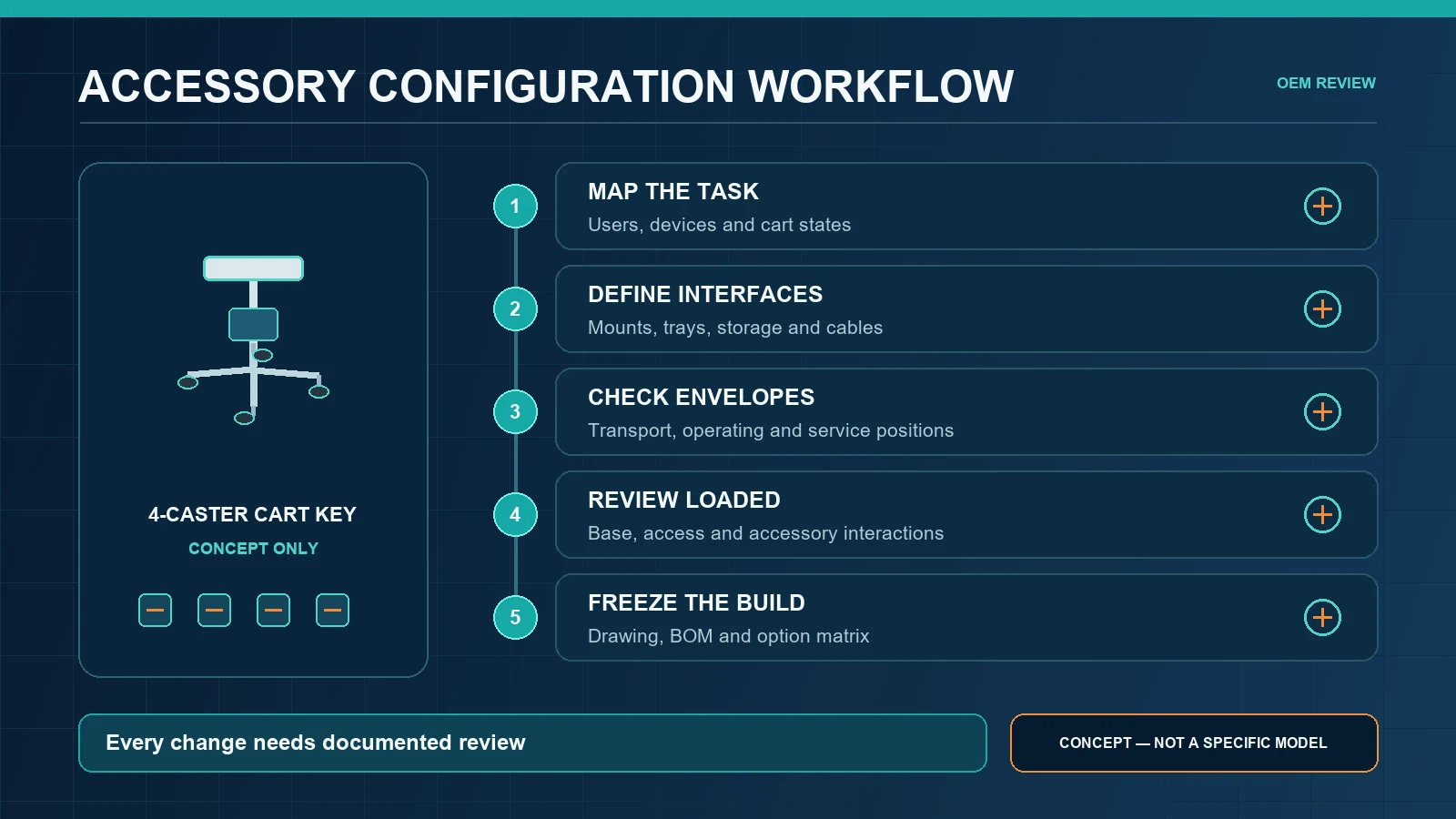
Five-stage accessory configuration review
1. Collect authoritative device inputs
Request equipment drawings, approved mass and center-of-gravity inputs, connector positions, mounting interfaces and operating envelopes. Mark unknowns instead of inventing dimensions.
2. Create an envelope layout
Show every accessory in transport, operating, open and service positions. Include doors, drawers, arms, cables and removable devices. Check for collisions and inaccessible controls.
3. Review the complete loaded cart
Evaluate the selected base, column, equipment, accessories and cables together. Accessories can change overall width, mass distribution, steering space and brake access. A base that appears suitable when empty still needs review in the approved configuration.
4. Inspect a representative sample
Use actual approved devices and contents where possible, or documented representatives accepted by the project team. Review assembly, retention, reach, visibility, movement, parking, cleaning access and service access against predefined criteria.
5. Freeze and control changes
Record the approved drawing, accessory identifiers, fasteners, installation positions, cable route, labels and bill of materials. Reassess relevant requirements when a device, accessory, location, base, caster or cable changes.
Procurement questions that expose hidden gaps
Ask each supplier:
- Which accessories and fasteners are included in the quoted scope?
- Which equipment is buyer-supplied?
- What exact device data was used to design each interface?
- Which accessory positions are fixed and which are adjustable?
- What operating and service envelopes are reserved?
- How are cables retained during transport and accessed during service?
- Can pedals, casters and base fasteners be reached in the loaded layout?
- Which configuration was used for sample review?
- What documents identify the approved accessories and revisions?
- What changes require engineering re-review?
A supplier should state assumptions and exclusions rather than imply compatibility with unspecified equipment.
Medical mobile cart accessory RFQ checklist
Include:
- intended use, users and destination markets;
- main device and peripheral drawings;
- approved mass and center-of-gravity inputs;
- workflow states and route constraints;
- preferred three-, four- or five-caster concept, if selected;
- named accessory list with exact contents;
- mount, tray, drawer, basket and handle requirements;
- cable types, connector locations and transport state;
- operating, adjustment and service envelopes;
- cleaning method and responsible-source material requirements;
- option matrix for each saleable configuration;
- prototype or sample-review conditions;
- packaging and assembly responsibilities; and
- document, revision and change-control requirements.
CRF references for configuration discussions
The CRF Aluminum Alloy Medical Monitor Cart is a current equipment-support reference whose page asks buyers to confirm dimensions, materials, compatibility and included accessories. The CRF 4-Wheel Universal Ultrasound/ECG Medical Cart is another reference that explicitly requires review of device dimensions, mounting, equipment weight and cable routing.
These pages are starting points, not proof that an accessory or device fits another project. Browse the CRF medical cart collection and request a configuration-specific drawing and quotation.
Limits of this guide
This article gives no universal accessory dimensions, load capacity, stability result, retention force, cleaning compatibility, certification, medical outcome, price, stock or delivery date. It does not claim that more accessories improve a cart. Suitability depends on the actual equipment, loaded arrangement, users, environment and verification plan.
FAQ
Which accessories are commonly considered for a medical mobile cart?
Projects may consider equipment trays, monitor mounts, drawers, baskets, handles, cable holders, keyboard trays and peripheral brackets. The correct set depends on the actual workflow and equipment; no accessory is automatically required.
Can one cart support several equipment configurations?
Potentially, but each allowed configuration should be identified in an option matrix with controlled interfaces, accessory positions and review status. Do not assume approval of one configuration covers every variant.
Should accessories be added after the prototype is approved?
Not informally. An added accessory may alter clearances, mass distribution, cable routing, brake access or cleaning and service procedures. Process it through documented change review.
Does a five-caster base support more accessories than a four-caster base?
Wheel count alone cannot answer that. Equipment weight, center of gravity, base size, caster layout, accessory positions, brakes and project-specific verification all matter.
Send CRF a controlled accessory configuration
Explore CRF’s aluminum medical equipment carts and send an RFQ through the contact page or a relevant product page, or email sales@szcrftech.com. Attach equipment drawings, the accessory option matrix, approved mass inputs, cable routes, workflow states and preferred base concept. Ask CRF to identify missing inputs and return a configuration-specific drawing, scope and sample-review proposal.